blog

Figure uses Thor for its synth sounds, and is awesome.

Propellerhead released “Figure” today. It’s $.99 and has a very unique M.O.

Picture iOS GarageBand’s Smart Instruments as a standalone app, but with very Reason-ish sounds, and a very friendly way of generating patterns while still making you feel like you’re doing the work (no dice buttons here, thankfully).

My favorite part: A “pump” dial. Why hasn’t anyone thought of this yet? This dial is hard-set to sidechain compress the synth tracks to the kick drum, which is how sidechains are set up 99% of the time. It usually takes some time to setup a good side chain. What a concept to just include this on the master track along with the levels!
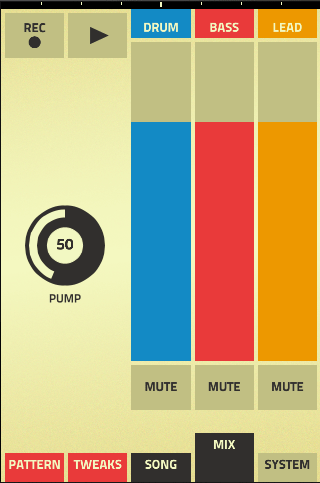
The other cool thing about Figure is that only the drums are sampled – the bass and lead are actually being synthesized by something. How did I find this out? My iPhone is jailbroken, so I dug into the app’s folder just to see.  The samples folder only has drums in it – then I saw the “Thor” folder:
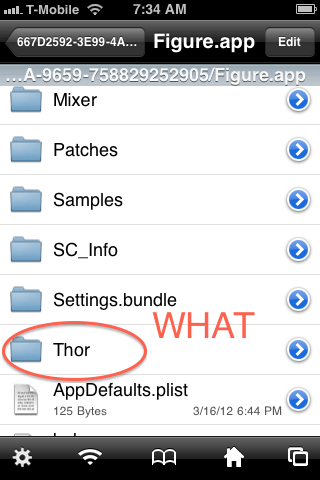
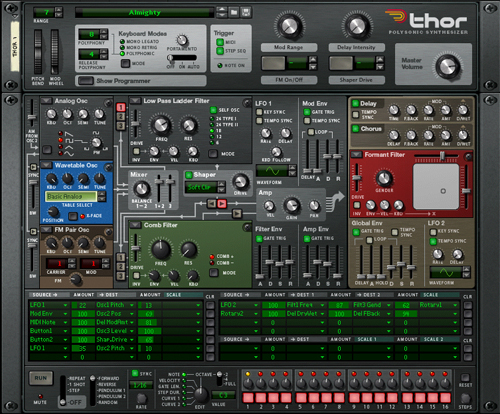
That’s right, when Propellerhead says “with Reason at its heart”, they mean freaking Thor is powering this thing.  Not like the NI Maschine app, either where the sounds are from Komplete, but they’re hard-coded samples.  Much of this is the real deal.  As far as I can tell, it’s just using the Wavetable part of Thor, but it looks like there is room to add more of Thor’s modules in later.
Major downside for now: no save, no export, and no audiocopy.  So, while this is one of the more powerful instrument apps out there, there’s no way to actually *use* this app in a song.

I also noticed that Figure is conspicuously not an iPad app.  Maybe there are more surprises in store?  They obviously have big chunks of Reason working on iOS, and are investing serious resources into this platform.   I’m very excited to see what else Propellerhead comes up with in this dept.  For now, I’m going to be messing around with Figure!

Figure on the iTunes store – $.99

The new Ableton Live Lite: Revolution for schools?

I love Ableton and all their products.  They make the world a better place.  But not everyone could afford the software, until today.  The question remains – is the free version Soundcloud offers good enough, or do you really have to buy at least Live Intro to do any real work?

It turns out to be a tough question to answer.

Now that Soundcloud users are getting Live Lite for free, of what remaining value is their entry level product, Live Intro?  It’s difficult to compare these two products – for one, Live Lite up until today was only bundled with select hardware devices, and probably has a pretty small user base considering lots of people buy that gear and just throw out the discs that come with it.  Live Intro is pitched as a similar solution to Live Lite, but what’s the difference between these two?

There isn’t a direct comparison chart on ableton.com.  This is what is posted on their site:

Live Lite vs Live 8

Live Intro vs Live 8

Well lucky you, dear readers – I saved you the trouble of lining these two up.  Here’s a chart I made putting the two cheap versions side-by-side with the full version, showing advantages in green:

This ignores any of the add-on content from the boxed version of Intro as well, which may or may not matter to you.

The differences between the free Live Lite and the $99 Live Intro are quite subtle, and now that there is no hardware to buy for Live Lite, one should consider if they really need the paid version.   The key difference seems to be the 64 audio tracks, which would give the ability to make a long DJ set, played in arrangement mode, feasible.  Having 2 extra scenes in Session mode is nice.  But still, those are only a couple things.

In the EDU market, this gets even trickier.  The Live Intro site license runs slightly north of $1000 for a school.  Do I buy Live Intro for $1000 or use the slightly-less-capable-but-close-enough-and-also-free Live Lite?  Live Lite is free, and there doesn’t seem to be any knockout feature that Intro brings to the table other than slight spec bumps.  I say if you’re not sure, Live Lite for free is an excellent way of doing modern-style music writing in your classroom.

Conclusion: This leads me to believe that either a) Ableton intentionally obfuscates this information for marketing purposes or b) Live Intro is about to get a big upgrade.

Here’s hoping for option b!  Either way, lots of people will be downloading the free Live Lite, and getting introduced to this great software – hopefully lots of schools will notice this!

Ableton Live Lite to be totally free for Soundcloud users.

Holy crap. Usually this version comes as a pack-in when you buy a keyboard or MIDI controller. But now it’s free for everyone (of course, you can also now export directly to Soundcloud.)

If you’re signed up for Soundcloud’s newsletter, you’ll get a download code by mid-April.  You can also claim it from Ableton’s site, at least until May 31st.

http://blog.soundcloud.com/2012/04/02/soundcloud-and-ableton/

Ableton’s page: http://www.ableton.com/soundcloud

This is potentially huge. Make music!

Real VJ’ing comes to the iPad – finally!

So iPad apps to me are at an awkward middle-child phase. Some are incredibly powerful standalone products (like the Korg iMS-20) that are basically one-shots that do one thing, and others are “baby” versions of professional software, which is cool but limited in real-world usefulness.

Performance apps have a real opportunity here, where on stage one needs a limited amount of raw power but the “real” response and interface options so the crowd doesn’t think you’re playing with an unoriginal toy.

Haven’t found the holy grail for music apps yet (see the opportunity, o’ certain company whose products I adore?), but today I found a great solution for visualists and VJs if you maybe lack hardware for pro V-mixing or simply feel like packing light: TouchViz by hexler.

TouchViz reminds me a lot of this crazy Quartz Composer patch for video mixing from a few years back, except it is easy to use and actually works. Load up to 120 video clips (you’ll want to make or find these loops first) and then mash around with live effects and mixing during the set. 2 Channels. You’ll need the VGA out cable for your projectors.

Only downsides I can see from using for a little bit – no audio reactive option (definitely should be on the todo list for this developer, as all iPads have microphones) and I’d really REALLY like to see an option for setting projection map zones – it wouldn’t be too hard to implement a 3D effect layer for this or maybe even just a garbage matte that’s editable.

$9.99 on the App Store – a little more expensive than VDMX, but a lot cheaper than Resolume, and a whole heck of a lot more portable. Will EMG replace our custom hacked Gameboy cartridge with this next year?